Mesh Loading
This example shows 4 different ways to load and display Mesh in Vuer, and how to update the Mesh in real-time.
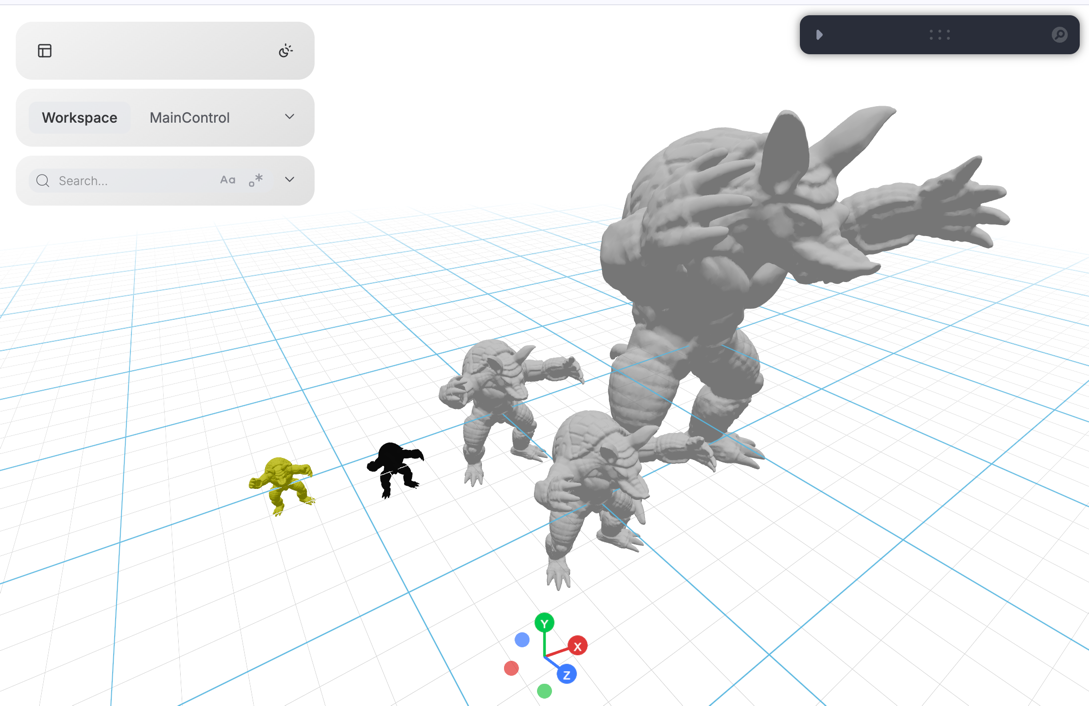
| Method | Component | Use Case |
|---|---|---|
| URL source | Obj(src=...) | Load from static server or CDN |
| Binary buffer | Obj(buff=...) | Pre-loaded binary data |
| Text content | Obj(text=...) | OBJ file as string |
| TriMesh | TriMesh(vertices=..., faces=...) | Direct numpy arrays, real-time updates |
Code Example
python
from asyncio import sleep
from pathlib import Path

import numpy as np
import trimesh

from vuer import Vuer
from vuer.events import Set
from vuer.schemas import Obj, DefaultScene, TriMesh, OrbitControls

# First, we load the mesh using trimesh and prepare the data in different formats:

assets_folder = Path(__file__).parent / "../../../../assets"
test_file = "static_3d/armadillo_midres.obj"

# Load mesh with trimesh for vertex/face data
mesh = trimesh.load_mesh(assets_folder / test_file)
assert isinstance(mesh, trimesh.Trimesh)
mesh.apply_scale(0.1)

# Prepare binary and text formats for Obj loader
with open(assets_folder / test_file, "rb") as f:
    data = f.read()  # Binary buffer
    text = trimesh.util.decode_text(data)  # Text content

# Now we create a Vuer app and set up the scene with all 5 loading methods:

app = Vuer(static_root=assets_folder)

print(f"Loaded mesh with {mesh.vertices.shape} vertices and {mesh.faces.shape} faces")

@app.spawn(start=True)
async def main(session):
    session @ Set(
        DefaultScene(
            # Method 1: Load from URL (static server)
            Obj(
                key="src-loader",
                src="http://localhost:8012/workspace/" + test_file,
                position=[3, 0, 0],
            ),
            # Method 2: Load from binary buffer
            Obj(
                key="buff-loader",
                buff=data,
                position=[1, 0, 0],
                scale=0.3
            ),
            # Method 3: Load from text content
            Obj(
                key="text-loader",
                text=text,
                position=[1, 0, 1],
                scale=0.3,
            ),
            # Method 4: TriMesh with vertices and faces (solid)
            TriMesh(
                key="trimesh",
                vertices=np.array(mesh.vertices),
                faces=np.array(mesh.faces),
                position=[0, 0, 0],
                color="#23aaff",
                materialType="depth",
            ),
            # Method 5: TriMesh wireframe mode
            TriMesh(
                key="wireframe",
                vertices=np.array(mesh.vertices),
                faces=np.array(mesh.faces),
                wireframe=True,
                position=[-0.3, 0, 0],
                color="yellow",
            ),
            # y-up
            up=[0, 1, 0],
            bgChildren=[
                OrbitControls(key="OrbitControls")
            ],
        ),
    )

    # Real-time mesh animation using TriMesh
    # This demonstrates why TriMesh is ideal for dynamic updates
    i = 0
    while True:
        i += 1
        x, z = 0.3 * np.sin(i / 10), 0.3 * np.cos(i / 10)
        session.update @ TriMesh(
            key="trimesh",
            vertices=np.array(mesh.vertices),
            faces=np.array(mesh.faces),
            position=[x, 0, z],
            color="#23aaff",
        )
        await sleep(0.016)